Best Printer for Linux: Picks That Just Work
The best printer for Linux for most UK homes and home offices is a Brother mono laser like the HL-L2865DW. Modern Linux systems can find it on the network and print without installing a vendor driver. Brother also provides .deb and .rpm packages if you need a fallback. If you need scanning, choose an all-in-one and check how its scanner works with Linux before buying. Printing and scanning need separate support.
This guide draws on published sources, including the Linuxano Linux printer buyer's guide, Tank & Toner's Linux laser list, Big Iron's driverless printing guide, the Printer Working Group's IPP Everywhere FAQ and Amazon UK listings. Both buyer's guides focus on the US market, so the printers selected here are UK models with live amazon.co.uk listings. We have not tested these printers ourselves.
Quick picks
- Best overall: Brother HL-L2865DW (mono laser, print only)
- Best with scanning: Brother DCP-L2660DW (print, scan, copy)
- Best with a document feeder and Ethernet: Brother MFC-L2800DW
- Best driverless all-in-one from HP: HP LaserJet MFP M234dw
- Best for colour: Epson EcoTank ET-4800 (ink tank, Ethernet, feeder)
- Best for a print server or heavy use: Brother HL-L5210DN (Gigabit Ethernet)
We may earn a commission if you buy through links on this page. It never changes our verdicts. How we review.
Brother HL-L2865DW mono laser printer
Brother DCP-L2660DW 3-in-1 mono laser
Print vs scan support table
Linuxano makes an important distinction: CUPS handles printing, while SANE handles scanning. They use separate drivers. That's why the table covers both. "Driverless print" refers to IPP Everywhere or AirPrint over a network. "Scan route" identifies the SANE backend recommended by the sources.
| Printer (UK model) | Driverless print | Official Linux driver | Scan route | Source, checked 13 Nov 2026 |
|---|---|---|---|---|
| Brother HL-L2865DW | Expected (IPP Everywhere, network) | Brother .deb/.rpm (fallback) | No scanner | Tank & Toner (Brother family), Big Iron |
| Brother DCP-L2660DW | Expected (network) | Brother .deb/.rpm | brscan SANE backend over USB; sane-airscan over Wi-Fi | Linuxano (Brother family) |
| Brother MFC-L2800DW | Expected (network) | Brother .deb/.rpm | brscan over USB; sane-airscan over network | Linuxano, Tank & Toner |
| HP LaserJet MFP M234dw | Yes, IPP Everywhere certified per Linuxano | HPLIP (optional) | sane-airscan (eSCL); USB also works | Linuxano |
| Epson EcoTank ET-4800 | Expected (AirPrint on listing family) | Epson .deb/.rpm | epsonscan2 over USB; sane-airscan over Wi-Fi | Linuxano (EcoTank family) |
| Brother HL-L5210DN | Expected (network) | Brother .deb/.rpm | No scanner | Tank & Toner (HL-L5210 family) |
"Expected" means the sources cover the printer family rather than the exact UK SKU. Big Iron says virtually every printer shipped since 2017 supports IPP Everywhere, although some Brother models are exceptions. Check the manufacturer's Linux support page for the exact model before ordering.
What matters for a Linux printer
- IPP Everywhere, AirPrint or Mopria on the spec sheet. Big Iron describes all three as signs of a "modern self-describing printer". The PWG says computers running CUPS 1.5 or later support IPP Everywhere.
- An Ethernet port. Tank & Toner recommends Brother partly for its combination of Ethernet, USB and Wi-Fi. These connections mean you don't have to rely on a vendor app or cloud service.
- Official .deb or .rpm packages as a fallback. Linuxano notes that Brother and Epson both publish them. HP offers HPLIP.
- A scan route. Network scanning generally uses sane-airscan. USB scanning often requires the manufacturer's SANE backend.
- Laser if it sits idle. Linuxano warns that inkjet print heads can dry out when a printer goes unused for weeks.
The picks
Brother HL-L2865DW: best overall
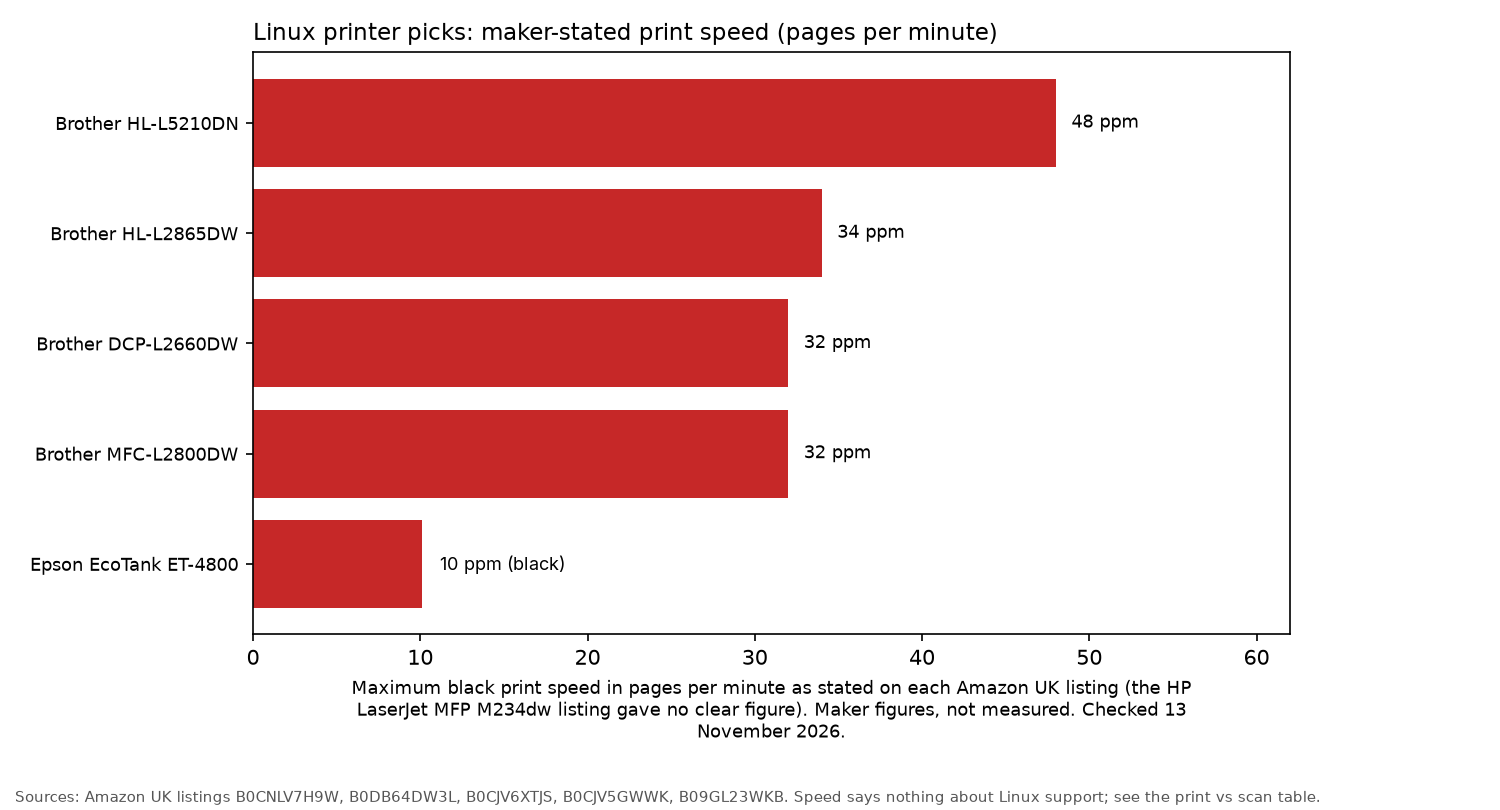
The HL-L2865DW is a compact wireless mono laser printer. Its listing specifies speeds up to 34 pages per minute, automatic 2-sided printing, a 250-sheet paper tray and 125 MB of memory.
Tank & Toner recommends the US-market HL-L2460DW for similar reasons: Brother provides Linux downloads and supports both network and USB connections. Sold by Amazon.
Who it's for: people printing black documents from a desktop or home server. Who it isn't for: anyone who needs a scanner.
Brother DCP-L2660DW: best with scanning
The DCP-L2660DW combines printing, scanning and copying. According to its listing, it prints up to 32 pages per minute and includes a 6.7 cm colour touchscreen, 5 GHz Wi-Fi and USB. It comes with a 1,200-page starter toner, with a 3,000-page toner also available.
Tank & Toner's advice for the equivalent US model is worth following: check the scanner early.
Who it's for: home offices that regularly scan letters and receipts. Who it isn't for: anyone who needs Ethernet, as the listing specifies Wi-Fi and USB only.
Brother MFC-L2800DW: best with a feeder and Ethernet
The MFC-L2800DW is an all-in-one with fast Ethernet, 5 GHz Wi-Fi and USB. It prints up to 32 pages per minute and has a 250-sheet paper tray.
One detail worth checking is the starter toner. According to the listing, it's rated for 700 pages.
Who it's for: people who need to scan multi-page documents into a Linux computer. Who it isn't for: occasional users who don't want to pay extra for a fax and document feeder.
HP LaserJet MFP M234dw: best driverless all-in-one
Linuxano reports that the M234dw is IPP Everywhere certified. That means modern versions of Ubuntu, Fedora and Mint can detect it and print without installing drivers. Scanning works through eSCL using sane-airscan.
The printer has USB, Wi-Fi, Ethernet and a 150-sheet paper tray. A third-party seller offers it on amazon.co.uk. Check who the seller is before ordering.
Who it's for: people who want to print without installing drivers. Who it isn't for: anyone who needs a document feeder.
Epson EcoTank ET-4800: best for colour
The ET-4800 is an ink tank all-in-one with Wi-Fi, Ethernet, fax and a 30-page document feeder. Epson's listing states that one set of ink bottles can print up to 4,500 black pages and 7,500 colour pages. The same listing states print speeds of up to 10 pages per minute.
Linuxano says Epson publishes .deb and .rpm drivers for current EcoTank models, including epsonscan2 for USB scanning. Sold by Amazon.
Who it's for: households that print in colour every week. Who it isn't for: people who only print once a month, as the ink can dry out.
Brother HL-L5210DN: best for a print server
The HL-L5210DN is designed for wired printing, with USB 2.0 and Gigabit Ethernet but no Wi-Fi. That makes it a good fit for a server cupboard.
According to its listing, it prints up to 48 pages per minute and has a 250-sheet tray, expandable to 1,290 sheets. It includes a 3,000-page toner, with 11,000-page toners available. A third-party seller offers it on amazon.co.uk. Check who the seller is before ordering.
Who it's for: home labs and small offices sharing a printer over the network. Who it isn't for: anyone who needs Wi-Fi or scanning.
5-step driverless setup
- Install the required services with
sudo apt install cups cups-browsed avahi-daemon avahi-utils, then start Avahi usingsudo systemctl enable --now avahi-daemon, as described by Big Iron. - Check whether the printer advertises itself on the network using
avahi-browse --resolve --terminate _ipp._tcp. - Open the CUPS web interface at
http://localhost:631and select the "IPP Everywhere" driver. Alternatively, add the printer with this command:sudo lpadmin -p Office -E -v ipp://printer.lan:631/ipp/print -m everywhere
- If the printer is on a different VLAN, mDNS won't reach it. Big Iron recommends using the printer's direct IP address instead.
- To set up scanning, install
sane-airscanand runscanimage -Lto check whether Linux can see the scanner.
For more Linux hardware advice, visit the Linux hub, compare the best mini PC for a home server, browse Raspberry Pi 5 kits or read self-hosting: getting started.
FAQ
Which printer brand works best with Linux?
The sources favour Brother laser printers. Brother provides Linux drivers on its own website, alongside Ethernet and USB connectivity. Newer HP models with driverless printing are also a strong choice.
Do HP printers work on Linux?
Yes. Newer HP printers such as the M234dw support driverless printing. HPLIP also provides support for additional features and scanning.
What is IPP Everywhere?
IPP Everywhere is a Printer Working Group standard that allows CUPS to print over a network without special printer software. According to the PWG, it's supported by CUPS 1.5 and later.
Will the scanner work on Linux too?
Often, but scanning support needs checking separately from printing. Network scanners generally work through sane-airscan, while USB scanners may require the manufacturer's SANE backend.
As an Amazon Associate I earn from qualifying purchases.