Best Managed Switch for Home Lab UK (2026)

The best managed switch for home lab UK builds is the MikroTik CRS310-8G+2S+IN for most people. It has eight 2.5GbE ports, two 10G SFP+ cages and full VLAN support through RouterOS or SwOS. Need PoE+ too? The fanless TP-Link SG2210XMP-M2 offers a 160 W budget. For a cheaper option, the gigabit TP-Link TL-SG108E supports tagged VLANs without costing much. The decision table below helps you choose based on port count, speed, PoE requirements and budget.
Specs come from maker spec pages and the UK Amazon listings, checked on 19 November 2026, plus published reviews that we credit by name. We have not tested these switches ourselves; this guide brings published information together.
Jump to: Quick picks · Decision table · Spec table · The switches · How to choose · FAQ
We may earn a commission if you buy through links on this page. It never changes our verdicts. How we review.
Quick picks
- Best overall: MikroTik CRS310-8G+2S+IN (8 x 2.5GbE, 2 x 10G SFP+, RouterOS or SwOS)
- Best 2.5GbE with PoE+: TP-Link SG2210XMP-M2 (160 W, fanless, Omada)
- Best simple 2.5GbE: Netgear MS308E (fanless, web managed)
- Best budget VLAN switch: TP-Link TL-SG108E (gigabit, 32 VLANs)
- Budget PoE+: TP-Link TL-SG108PE (4 PoE+ ports, 64 W)
- For a UniFi network: UniFi Switch Lite 8 PoE
Decision table: your need against budget band
Switch prices change, so this guide uses three budget bands instead of fixed amounts. Entry covers basic gigabit easy smart switches. Mid covers 2.5GbE or gigabit PoE+ models, while upper covers 2.5GbE switches with 10G uplinks or 2.5GbE PoE+. The table shows which models suit different home lab needs at each level.
| Your need | Entry band | Mid band | Upper band |
|---|---|---|---|
| VLANs for a lab, IoT and guest network on gigabit | TP-Link TL-SG108E or Netgear GS308E | UniFi Lite 8 PoE (if you run UniFi) | Not needed |
| Power access points or cameras (PoE+) | TP-Link TL-SG108PE (4 ports, 64 W) | UniFi Lite 8 PoE (4 ports, 52 W) | TP-Link SG2210XMP-M2 (8 ports, 160 W) |
| 2.5GbE to a NAS, mini PC or hypervisor | Not available in this band | Netgear MS308E | MikroTik CRS310-8G+2S+IN |
| 10G link to a NAS or second switch | Not available | Not available | MikroTik CRS310 or SG2210XMP-M2 (2 x SFP+ each) |
| Silent, in a room you sleep or work in | TL-SG108E, GS308E or TL-SG108PE (all fanless) | Netgear MS308E | SG2210XMP-M2 (fanless); the CRS310 has a fan |
| Learn routing and advanced switching | TL-SG108E for basics | UniFi for a dashboard | MikroTik CRS310 (RouterOS v7, hardware Layer 3) |
A switch carries VLAN traffic, but it does not control which VLANs can communicate with each other. As JPK.io explains, "The router or firewall decides which VLANs can communicate." Make sure you plan your firewall rules as well as your switch configuration.
Spec table
| Switch | Ports | PoE | Uplinks | VLANs (maker) | Cooling |
|---|---|---|---|---|---|
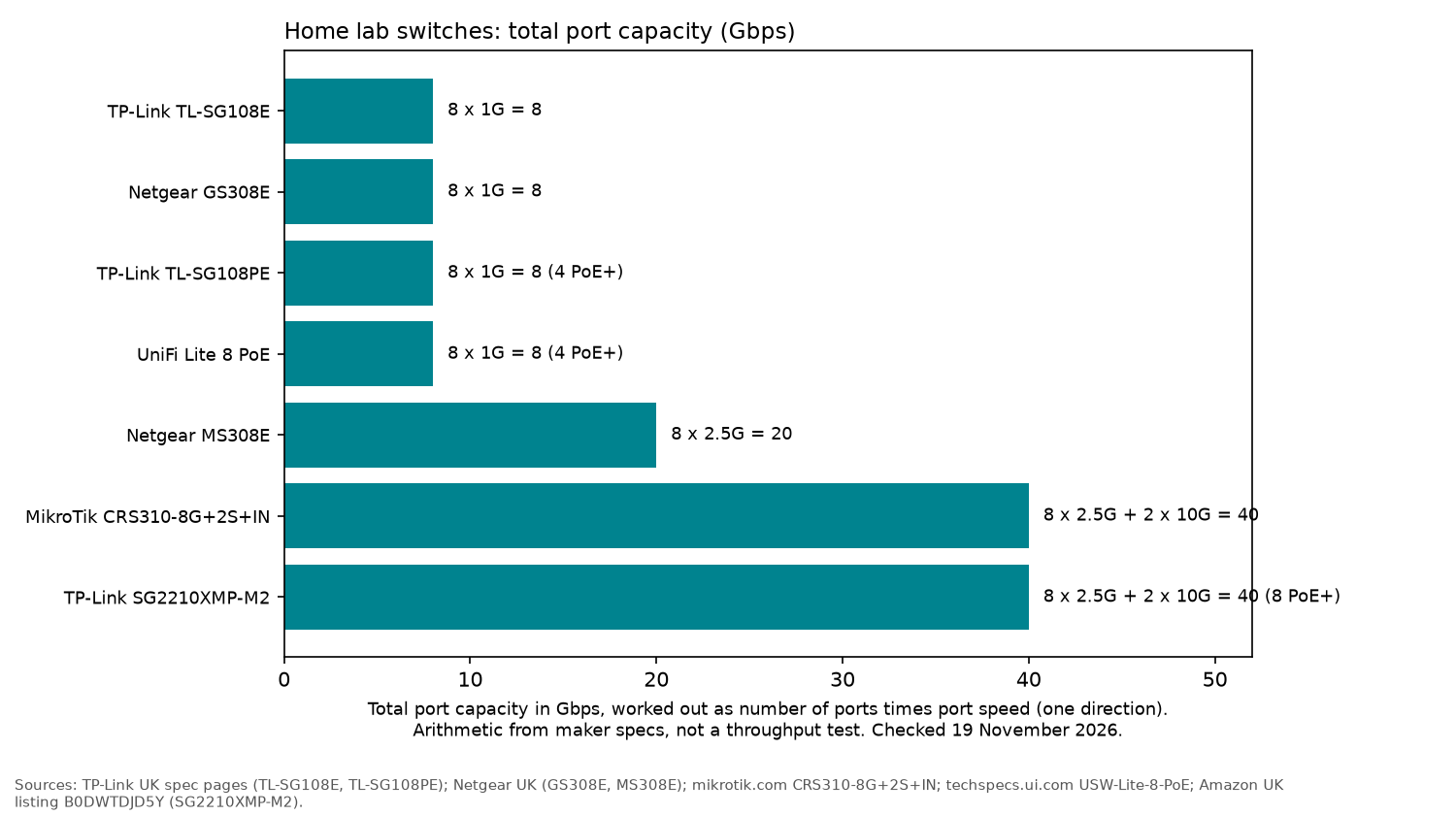
| MikroTik CRS310-8G+2S+IN | 8 x 2.5GbE | None | 2 x 10G SFP+ | Yes (RouterOS v7 / SwOS) | 1 fan |
| TP-Link SG2210XMP-M2 | 8 x 2.5GbE | 8 x PoE+, 160 W | 2 x 10G SFP+ | Yes (Omada) | Fanless |
| Netgear MS308E | 8 x 2.5GbE | None | None | Yes | Fanless |
| UniFi Switch Lite 8 PoE | 8 x 1GbE | 4 x PoE+, 52 W | None | 1,000 | Not stated |
| TP-Link TL-SG108PE | 8 x 1GbE | 4 x PoE+, 64 W | None | 32 | Fanless |
| TP-Link TL-SG108E | 8 x 1GbE | None | None | 32 | Fanless (listing: 3.68 W) |
| Netgear GS308E | 8 x 1GbE | None | None | 64 | Fanless |
MikroTik CRS310-8G+2S+IN: best overall
According to MikroTik's spec page, the CRS310 has eight 2.5GbE ports and two 10G SFP+ ports. Inside are a Marvell 98DX226S switch chip and a dual-core 800 MHz ARM CPU. It runs RouterOS v7 or SwitchOS, has one fan and draws a maximum of 34 W. Rack ears are included.
MikroTik also lists support for VLANs, jumbo frames, link aggregation, ACL rules and some hardware-offloaded Layer 3 routing.
ComputingForGeeks rates it as the best overall homelab switch, although it points out two drawbacks: "a loud stock fan and a steeper config curve".
Who it's for: home labs with a 2.5GbE or 10G NAS, or anyone keen to learn RouterOS.
Who it isn't for: people who need PoE or want a quiet switch for a bedroom or office.
TP-Link SG2210XMP-M2: best 2.5GbE with PoE+
The TP-Link SG2210XMP-M2 combines eight 2.5GbE PoE+ ports with two 10G SFP+ slots. According to its UK listing, each PoE+ port supports up to 30 W, with a total budget of 160 W. It also offers 80 Gbps switching capacity and static routing.
The 226 x 131 x 35 mm case is fanless. Management is available either standalone or through TP-Link's Omada cloud and app.
Who it's for: setups with several PoE access points and cameras that need one quiet switch.
Who it isn't for: smaller labs with no PoE devices.
Netgear MS308E: best simple 2.5GbE
The Netgear MS308E has eight 2.5G multi-gig ports and a web management interface. Netgear's page describes a "robust metal desktop case with silent fanless operation" and confirms that it can be mounted on a desk or wall.
The Amazon listing also mentions VLANs, QoS and a 3-year hardware warranty. Netgear's page says a limited lifetime hardware warranty. Note that Amazon's details table describes the case as plastic, while the listing's about text calls it a compact metal design. We go by Netgear's own page.
Who it's for: connecting a desktop, NAS and router at 2.5GbE with basic VLAN support.
Who it isn't for: anyone who needs a 10G uplink.
TP-Link TL-SG108E: best budget VLAN switch
TP-Link's spec page gives eight gigabit ports and up to 32 VLANs at once (MTU, port and 802.1Q tag VLANs), with QoS, IGMP snooping, port mirroring, link aggregation and loop prevention. The listing gives a 3.68 W draw and a metal case.
Who it's for: a first home lab switch for separating lab, IoT and guest traffic.
Who it isn't for: setups needing speeds above gigabit.
The Netgear GS308E is the alternative: eight gigabit ports, fanless, and 64 VLANs on Netgear's spec page.
TP-Link TL-SG108PE: budget PoE+
The TP-Link TL-SG108PE offers the same easy smart features with the addition of PoE+. According to TP-Link, it has four 802.3af/at PoE+ ports, each capable of supplying up to 30 W, with a combined power budget of 64 W.
It is fanless and includes PoE Auto Recovery, which restarts a powered device if it becomes stuck.
UniFi Switch Lite 8 PoE: for a UniFi network
Ubiquiti's tech specs give eight gigabit ports, four of them PoE+, 52 W of PoE, 1,000 supported VLANs, 16 Gbps switching capacity, LACP, 802.1X and DHCP snooping. It makes most sense if you already run a UniFi gateway. JPK.io says the UniFi dashboard makes VLANs and port profiles visible in one place.
How to choose a home lab switch
- Managed means 802.1Q: Don't assume a cheap switch supports tagged VLANs just because it advertises a "VLAN" mode. Some unmanaged models only offer port isolation, as ServeTheHome notes in its BrosTrend S1-V2 review. Tagged VLANs are needed for trunks to a hypervisor or access point.
- Speed: Check the ports on your NAS, mini PC and router before spending more on 2.5GbE. It only helps if those devices support it.
- Uplinks: SFP+ cages let you connect a NAS or another switch using a 10G DAC or fibre module.
- PoE budget: Add together the power draw of all your access points and cameras, then allow some headroom.
- Noise: A fanless model is worth considering if the switch will sit in a living space.
- Management style: Choose the interface that suits you: a web UI from TP-Link or Netgear, a controller through Omada or UniFi, or MikroTik's RouterOS.
Planning the rest of your setup? The guides to the best mini PC for a home server, best UPS for a home server and best Raspberry Pi 5 kit for a home server cover other useful home lab hardware.
FAQ
Do I need a managed switch for a home lab?
Yes, if you want to separate lab, IoT and guest traffic using VLANs. An unmanaged switch cannot carry tagged VLANs.
Is 2.5GbE worth it for a home lab?
Yes, if your NAS or servers have 2.5GbE ports. Each port can carry up to 2.5 times the gigabit rate. If your devices only support gigabit, a gigabit managed switch is enough.
Which home lab switches are fanless?
Every switch listed here is fanless except the MikroTik CRS310, which has one fan, and the UniFi Lite 8 PoE, whose cooling arrangement is not stated on Ubiquiti's spec page.
What is the difference between a smart and a fully managed switch?
Easy smart switches provide VLANs, QoS and monitoring through a web interface. Fully managed models such as the CRS310 go further, adding routing, ACLs and command-line management.
How much PoE do I need?
Start by adding up the power requirements of your devices. PoE+ supports up to 30 W per port, while the switches covered here have total PoE budgets ranging from 52 W to 160 W.
As an Amazon Associate I earn from qualifying purchases.