Best KVM Switch for Linux (2026)
The best KVM switch for Linux if you have one monitor and two computers is the UGREEN 8K DisplayPort KVM switch. It supports DisplayPort 1.4 and 4K at 120Hz, has four USB 3.0 ports and lists Linux compatibility without needing a driver.
For two monitors, the UGREEN dual-monitor HDMI switch lets you share both screens between computers. If you run GNOME on Wayland and want your windows to stay where they are when switching, the TESmart 4-computer, 2-monitor switch is the better choice. It's the only model here whose listing promises both EDID emulation and hotkey switching.
Specs come from the UK Amazon listings and maker pages, checked on 21 November 2026, plus Linux user reports on the Level1Techs forum and GitHub that we credit by name. We have not tested these switches ourselves; this guide brings published information together.
Jump to: Quick picks · Linux compatibility checklist · The switches · How to choose · FAQ
We may earn a commission if you buy through links on this page. It never changes our verdicts. How we review.
Quick picks
- Best overall: UGREEN 8K DisplayPort KVM switch, 2 PCs and 1 monitor (DP 1.4, 4 x USB 3.0)
- Best for two monitors: UGREEN HDMI KVM switch, 2 monitors and 2 PCs, 4K at 60Hz
- Best for high refresh dual screens: UGREEN HDMI KVM switch, 2 monitors, 8K at 60Hz and 4K at 120Hz
- Best for Wayland and homelabs: TESmart DisplayPort KVM switch, 4 PCs and 2 monitors (EDID emulation, hotkeys)
- Best budget: UGREEN HDMI KVM switch, 2 PCs and 1 monitor, 4K at 60Hz (USB 2.0)
Linux compatibility checklist
A KVM switch needs no Linux driver; what matters is how it behaves when you move away from a computer. Without EDID emulation, the computer you leave sees its monitor unplugged. On the Level1Techs forum, a Fedora user explains that GNOME "will move all the windows to the secondary monitor until the primary monitor is reconnected", and a user on Super User describes the same window shuffling on CentOS Stream 9 under Wayland.
This table only shows what each Amazon UK listing states. "Not stated" means the listing does not mention it; "No" means the listing says it is not supported.
| Switch | Video | Max resolution (listing) | USB | EDID emulation | Hotkey switching | Linux on listing |
|---|---|---|---|---|---|---|
| UGREEN 8K DisplayPort, 2 PCs, 1 monitor | DisplayPort 1.4 | 8K 60Hz, 4K 120Hz | 4 x USB 3.0 (3 A, 1 C) | Not stated | No | Yes |
| UGREEN HDMI, 2 monitors, 2 PCs | HDMI | 4K 60Hz, 1440p 120Hz, 1080p 240Hz | 4 x USB 3.0 (3 A, 1 C) | Not stated | No | Yes |
| UGREEN HDMI 8K, 2 monitors, 2 PCs | HDMI 2.1 cables | 8K 60Hz, 4K up to 240Hz | 4 x USB 3.0 (3 A, 1 C) | Not stated | No | Yes |
| TESmart DisplayPort, 4 PCs, 2 monitors | DisplayPort | 4K 60Hz (4K 144Hz with DSC) | 4 x USB 3.0 (3 A, 1 C) | Yes, on each DP port, on or off from the front panel | Yes | In description and compatibility field, not bullets |
| UGREEN HDMI, 2 PCs, 1 monitor | HDMI 2.0 | 4K 60Hz, 1440p 120Hz | 4 x USB 2.0 | No | No | Yes |
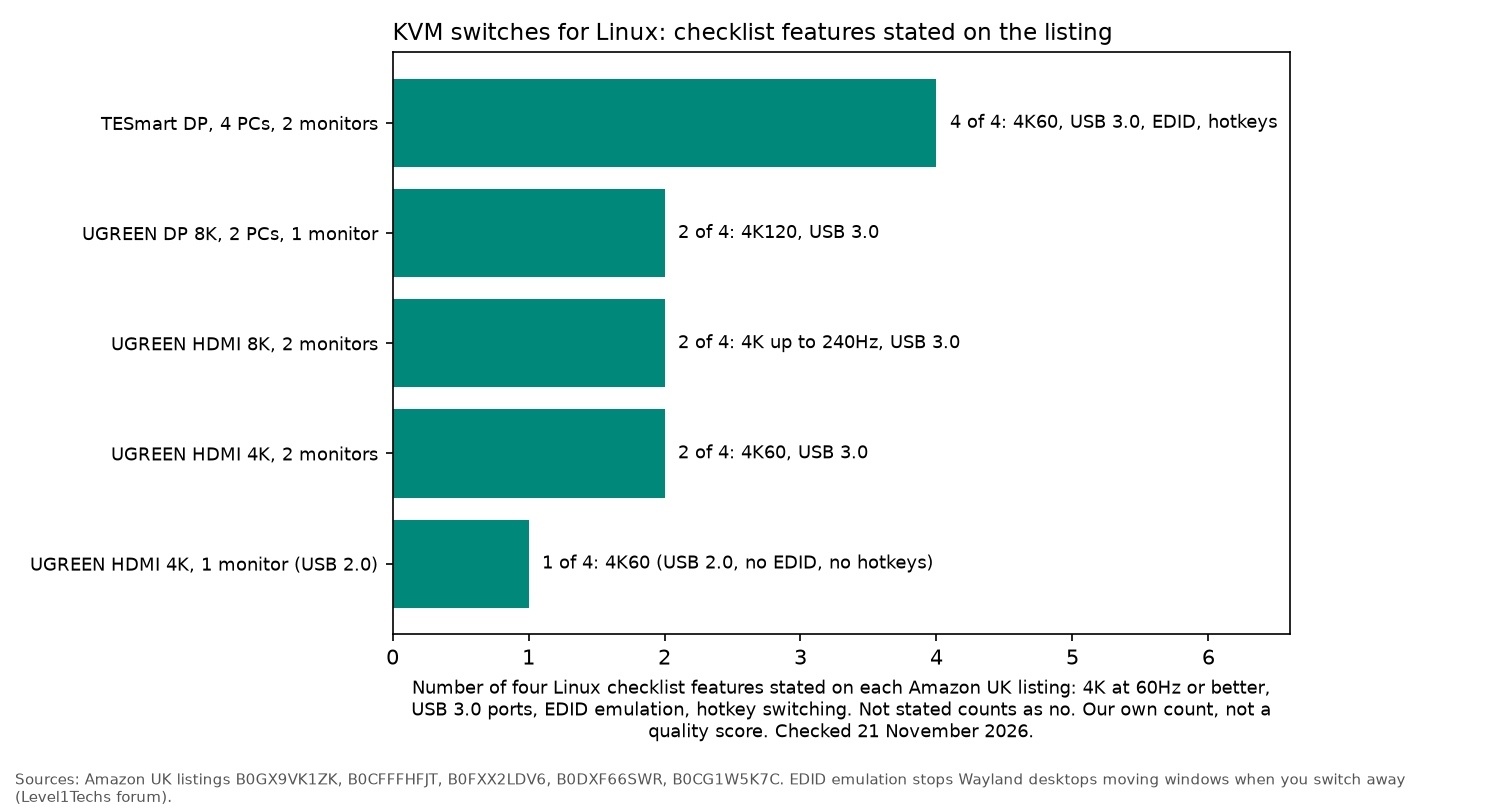
Who needs EDID emulation: anyone on GNOME, or a tiling Wayland compositor such as Hyprland (also reported on the Level1Techs forum), who keeps windows open on the switched screen. Who can skip it: single-monitor users who switch rarely, or anyone happy to let the desktop rearrange itself. There is also a software route: the Fedora EDID KVM config project shows how to load a saved EDID with the drm.edid_firmware= and video= kernel parameters, tested by its author on Fedora 38 with AMD graphics under X11.
UGREEN 8K DisplayPort KVM switch: best overall
The UGREEN 8K DisplayPort KVM switch shares one monitor and four USB 3.0 ports (three USB-A, one USB-C, up to 5Gbps) between two computers. The listing gives DisplayPort 1.4 with 8K at 60Hz and 4K at 120Hz, names Linux alongside Windows and macOS, and says no software driver is needed. You switch with the button on the box or the included desktop controller; the listing says hotkey switching is not supported. UGREEN gives a 2-year warranty.
The listing title says 4K at 240Hz, while its bullet points say 4K at 120Hz, so check the listing for the refresh rate you need.
Who it's for: a desktop and a work laptop or second PC on one DisplayPort monitor. Who it isn't for: Wayland users who need the idle PC to keep seeing its monitor, as EDID emulation is not stated. UGREEN also advises against using it with a docking station.
UGREEN HDMI KVM switch for 2 monitors: best for two monitors
This UGREEN switch (model AK500) runs two HDMI monitors from two computers, so each PC needs two HDMI outputs plus one USB-A cable. The listing gives 4K at 60Hz, 2560 x 1440 at 120Hz and 1080p at 240Hz, with HDR, and four USB 3.0 ports (three USB-A, one USB-C). Linux is named on the listing, there is no driver, and switching is by button or desktop controller, not hotkeys.
Who it's for: a two-screen desk shared by a Linux workstation and a second machine. Who it isn't for: laptops with only USB-C; UGREEN says you would need a USB-C to USB-A OTG adapter plus a way to drive two HDMI outputs.
UGREEN 8K HDMI KVM switch for 2 monitors: best for high refresh
The 8K version (model AK703) keeps the same two-monitor, two-computer layout but raises the listed limits to 8K at 60Hz and 4K at 240Hz, 144Hz, 120Hz or 60Hz. It ships with four HDMI 2.1 cables. Again: four USB 3.0 ports, Linux named, no hotkeys.
Who it's for: a gaming PC and a Linux work machine sharing two high refresh monitors. Who it isn't for: anyone happy at 4K 60Hz, where the AK500 above does the job.
TESmart DisplayPort KVM switch, 4 PCs and 2 monitors: best for Wayland and homelabs
The TESmart switch connects four computers to two DisplayPort monitors. Its listing is the only one here that states an EDID emulator on each DisplayPort port, which you can turn on or off from the front panel, and hotkey switching, along with a remote. Listed resolutions include 4K at 60Hz, 4K at 144Hz with DSC, 3440 x 1440 at 120Hz and 2560 x 1440 at 165Hz. USB sharing is four USB 3.0 ports (three A, one C), one of them a 7.5W charging port.
The listing's description and compatibility field mention Linux, but its bullet points do not. Hotkeys work by the switch reading your keyboard, so check your keyboard works through it.
Who it's for: homelab users and anyone running GNOME or another Wayland desktop who wants windows to stay put. Who it isn't for: a simple two-computer desk.
UGREEN HDMI KVM switch, 2 PCs and 1 monitor: best budget
The cheapest way in is UGREEN's HDMI 2.0 switch (model 15166A): one monitor, two computers, up to 4K at 60Hz or 2560 x 1440 at 120Hz, with HDR and HDCP 2.2. The four USB ports are USB 2.0, which is fine for a keyboard and mouse but slow for drives. The listing names Linux and says plainly that hotkey switching and EDID emulation are not supported. Both USB-A to B cables must be connected, as they carry power as well as data.
Who it's for: a keyboard, mouse and one screen shared between two machines on a budget. Who it isn't for: anyone sharing a webcam or external SSD.
How to choose a KVM switch for Linux
- Match the video port. Use DisplayPort if your graphics card and monitor have it, and HDMI otherwise. Count the outputs: a two-monitor switch needs two outputs on each computer.
- Decide on EDID. If windows jumping between screens would annoy you, buy a switch that states EDID emulation, or plan the kernel EDID override above.
- USB 3.0 for anything but input. Webcams, audio interfaces and drives need USB 3.0 ports; a keyboard and mouse do not.
- Hotkeys or a button. Most UGREEN models switch by button or a wired desktop controller only.
For a laptop on a Linux desk, a docking station for Linux or a USB-C hub for Linux can sit between the laptop and the KVM. Sharing a headset too? See the best Bluetooth adapter for Linux.
FAQ
Do KVM switches work with Linux?
Yes. Keyboard, mouse and USB ports pass through as standard USB devices, and video is not processed by the operating system. The four UGREEN picks name Linux in the listing bullets. The TESmart listing mentions Linux in its description and compatibility field, but not in its bullet points.
Why do my windows move when I switch my KVM?
Without EDID emulation, the computer you switch away from thinks the monitor was unplugged. GNOME then moves windows to the remaining screen, as Level1Techs forum users describe, and users report the same on other Wayland desktops.
Do I need a driver for a KVM switch on Linux?
No for the picks here. UGREEN's listings say no software drivers are required.
Does a KVM switch add input lag for gaming?
None of the listings quote a latency figure. Video passes through rather than being captured and re-encoded.
As an Amazon Associate I earn from qualifying purchases.