Best USB-C Hub for Linux Laptops UK (2026)
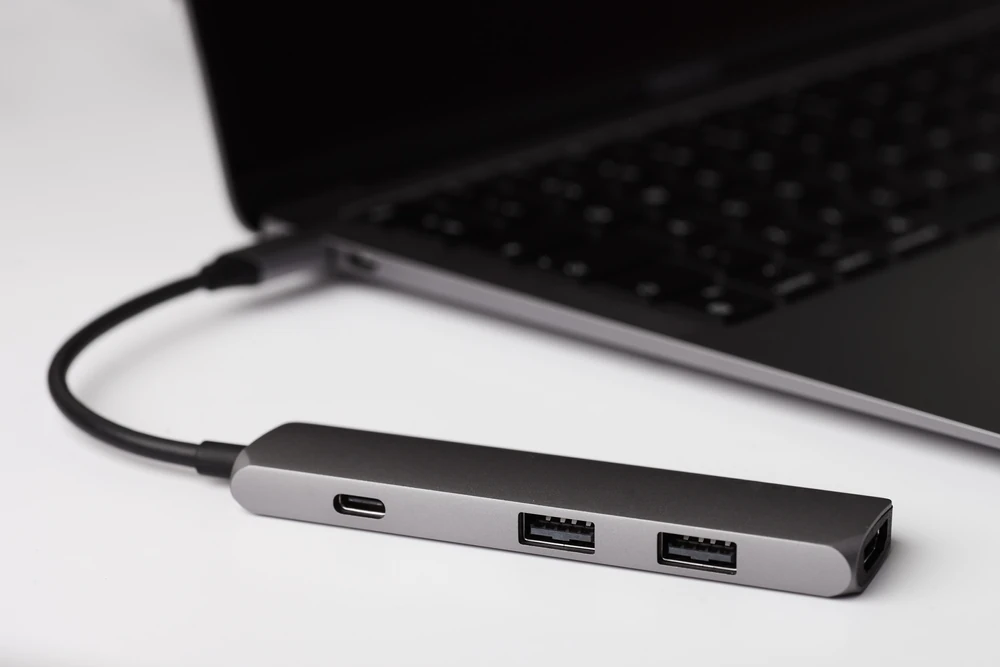
The best USB-C hub for Linux laptops is the Plugable 7-in-1 (USBC-7IN1E) for most people. It has Gigabit Ethernet using an ASIX AX88179A chip, which Plugable identifies on its spec page, HDMI at up to 4K 60Hz, SD and microSD readers and USB-C charging pass-through. There is no driver to install.
For faster USB transfers, the UGREEN Revodok Pro 9-in-1 offers 10Gbps ports alongside Ethernet and a card reader. The Anker 341 is a more affordable option if HDMI, SD and charging are your priorities. None of these six hubs needs DisplayLink, which is the single most important check for a Linux laptop.
Specs come from maker pages and the UK Amazon listings, checked on 20 November 2026, plus Linux documentation that we credit by name. We have not tested these hubs ourselves; this guide brings published information together.
Jump to: Quick picks · Linux compatibility table · Spec table · The hubs · How to choose · FAQ
We may earn a commission if you buy through links on this page. It never changes our verdicts. How we review.
Quick picks
- Best overall for Linux: Plugable 7-in-1 USBC-7IN1E (named ASIX Ethernet chip, 4K60 HDMI, SD and microSD)
- Best with 10Gbps ports and SD: UGREEN Revodok Pro 9-in-1
- Best compact Ethernet hub: UGREEN Revodok Pro 1061 6-in-1 (Ubuntu named on the listing)
- Best premium travel hub: Satechi 8-in-1 V3 (UHS-II card reader, Ethernet)
- Best budget hub with SD: Anker 341 7-in-1 (Linux listed by Anker)
- Cheapest HDMI and charging: UGREEN 5-in-1
Linux compatibility table: Ethernet chip, DisplayLink and charging
All six hubs drive their HDMI port through DisplayPort Alt Mode, so video depends on your laptop's USB-C port and graphics driver, not on a driver for the hub. Where a maker does not publish the Ethernet chip, we say so rather than guess.
| Hub | Ethernet chip | DisplayLink needed? | Charging pass-through | Linux note from the maker or listing |
|---|---|---|---|---|
| Plugable 7-in-1 (USBC-7IN1E) | ASIX AX88179A (Plugable spec page) | No (Alt Mode) | Listing: 100W pass-through, and up to 87W to the laptop | Plugable's spec page lists Linux hosts with Alt Mode as plug and play |
| UGREEN Revodok Pro 9-in-1 | Not published | No (Alt Mode) | 100W input, up to 85W to the laptop | Listing names macOS, not Linux |
| UGREEN Revodok Pro 1061 6-in-1 | Not published | No (Alt Mode) | 100W input, up to 85W to the laptop | Listing names Ubuntu 22.04 as a minimum OS |
| Satechi 8-in-1 V3 | Not published | No (Alt Mode) | 100W input, up to 85W to the laptop | Listing names Windows and macOS only |
| Anker 341 7-in-1 | No Ethernet port | No (Alt Mode) | 100W input, 85W to the laptop | Anker's page lists Linux 2.6.14 or later |
| UGREEN 5-in-1 | No Ethernet port | No (Alt Mode) | 100W PD port | Listing says it needs a host with DP Alt Mode and PD |
A hub or dock that runs two or three additional monitors from a standard USB-C port almost certainly uses DisplayLink. On Linux, this requires the evdi kernel module through DKMS plus Synaptics' DisplayLink driver. Kernel updates can cause problems with that setup. Single-HDMI hubs using Alt Mode avoid the extra driver.
Spec table
| Hub | HDMI | Ethernet | Card reader | USB data ports |
|---|---|---|---|---|
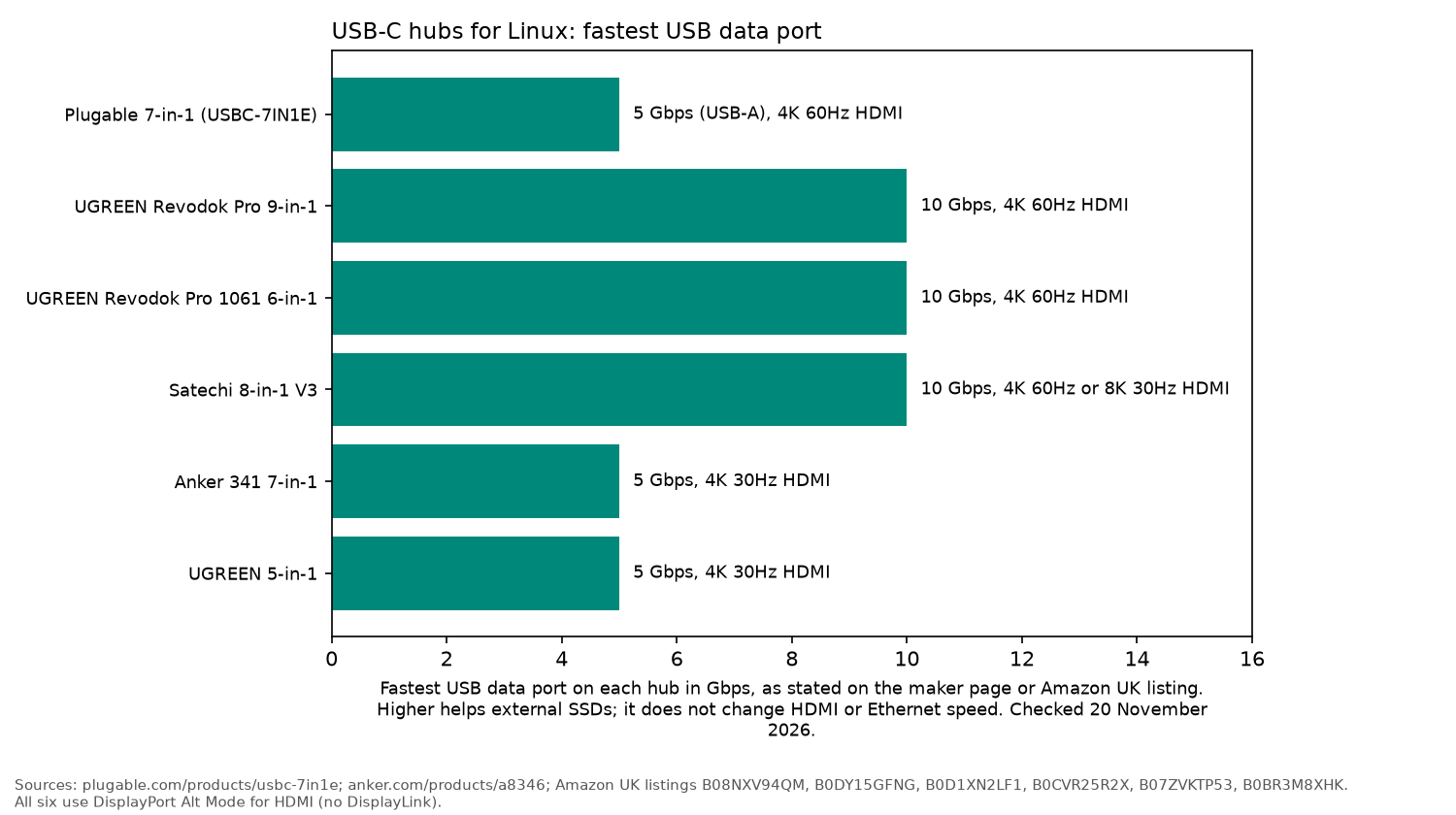
| Plugable 7-in-1 | 4K 60Hz (DP 1.4 hosts) | 1 Gbps | SD + microSD | 2 x USB-A 5Gbps |
| UGREEN Revodok Pro 9-in-1 | 4K 60Hz | 1 Gbps | SD + TF, 170MB/s | 2 x USB-C 10Gbps, 1 x USB-A 10Gbps, 1 x USB-A 5Gbps |
| UGREEN Revodok Pro 1061 | 4K 60Hz | 1 Gbps | None | 1 x USB-C, 2 x USB-A, all 10Gbps |
| Satechi 8-in-1 V3 | 8K 30Hz or 4K 60Hz | 1 Gbps | SD + microSD, UHS-II | 3 x 10Gbps, 1 x 5Gbps |
| Anker 341 7-in-1 | 4K 30Hz | None | SD + microSD | 2 x USB-A 5Gbps; USB-C data 480Mbps on Anker's spec table, up to 5Gbps on the listing |
| UGREEN 5-in-1 | 4K 30Hz | None | None | 1 x USB-A 5Gbps, 2 x USB-A 480Mbps |
Plugable 7-in-1 (USBC-7IN1E): best overall for Linux
Plugable's product page lists one HDMI port, Gigabit Ethernet, two USB 3.0 ports, SD and microSD slots and USB-C Power Delivery pass-through, and its wired network table names the ASIX AX88179A as the Ethernet chipset. Plugable describes it as plug and play on Chromebook, Windows, Mac and Linux hosts that support Alt Mode video. It also explains a catch that applies to every hub here: 4K at 60Hz needs a laptop port with DisplayPort 1.4, while many DP 1.2 hosts are limited to 4K at 30Hz.
The UK listing's bullets state 100W USB-C pass-through charging. The same listing's comparison table lists USB-C charging at up to 87W to the laptop.
ASIX publishes its own Linux driver source for the AX88179A family on GitHub, useful if an older kernel does not bring the port up. Plugable's page gives a 2-year warranty.
Who it's for: anyone who wants a known Ethernet chipset and a card reader in one hub.
Who it isn't for: people who need 10Gbps USB ports.
UGREEN Revodok Pro 9-in-1: best with 10Gbps ports and SD
The UK listing gives a 4K 60Hz HDMI port, two 10Gbps USB-C data ports, one 10Gbps and one 5Gbps USB-A port, SD and TF slots rated up to 170MB/s, Gigabit Ethernet and a 100W USB-C PD input that passes up to 85W to the laptop. UGREEN notes the USB-C data ports carry data only, not video or charging. The listing gives a 2-year warranty.
Who it's for: photographers and developers who want fast SSD ports, Ethernet and a card reader.
Who it isn't for: anyone who wants a published Ethernet chipset before buying.
UGREEN Revodok Pro 1061 6-in-1: best compact Ethernet hub
This hub weighs 61g, according to the UK listing, and has Gigabit Ethernet, 4K 60Hz HDMI, three 10Gbps data ports (one USB-C, two USB-A) and a 100W PD input with up to 85W pass-through. It is the only hub here whose Amazon details name a Linux distribution, Ubuntu 22.04, among its minimum operating systems.
Who it's for: a desk or bag hub where Ethernet and fast USB matter more than a card reader.
Who it isn't for: photographers who need SD.
Satechi 8-in-1 V3: best premium travel hub
The listing gives Gigabit Ethernet, HDMI up to 8K at 30Hz or 4K at 60Hz depending on the host, UHS-II SD and microSD readers, three USB 3.2 ports at 10Gbps, one at 5Gbps and a PD port that accepts 100W and delivers up to 85W. Satechi's listing names Windows and macOS rather than Linux, so treat Linux as likely but not promised.
Who it's for: UHS-II card users who want a smart, compact hub.
Who it isn't for: buyers who want written Linux support.
Anker 341 7-in-1: best budget hub with SD
Anker's page lists HDMI at 4K 30Hz, an SD slot and a microSD slot, two USB-A ports at 5Gbps, and a USB-C data port at USB 2.0 (480Mbps). The same page also describes transfers of up to 5Gbps through the USB-C data port and the USB-A ports, and the UK listing says those ports transfer at up to 5Gbps. Anker's page lists up to 85W of laptop charging from a 100W charger, with 15W powering the hub. Its compatibility list includes Linux 2.6.14 or later. There is no Ethernet port, and 4K at 30Hz suits documents more than video. Anker states an 18-month warranty.
Who it's for: students and Chromebook-style Linux laptops on a budget.
Who it isn't for: wired networking.
UGREEN 5-in-1: cheapest HDMI and charging
4K 30Hz HDMI, a 100W USB-C PD port, one 5Gbps USB-A port and two 480Mbps USB-A ports for a keyboard and mouse, per the UK listing. UGREEN states the host needs DisplayPort Alt Mode and Power Delivery.
How to choose a USB-C hub for Linux
- Check your laptop port first: HDMI on these hubs needs DisplayPort Alt Mode; some cheaper USB-C ports carry data only.
- Avoid DisplayLink unless you need several screens: it works on Linux but relies on an out-of-tree module, as the Arch Wiki explains. For two or more monitors, a proper dock is easier; see our best docking station for Linux.
- Prefer a named Ethernet chip: Plugable names the ASIX AX88179A. Run
lsusbafter plugging any hub in to see which chip you actually got. - 4K 60Hz needs DP 1.4 on the host: otherwise expect 4K 30Hz, as Plugable notes.
- Charging headroom: Anker says its hub uses 15W, so a 100W charger leaves 85W for the laptop. The UGREEN Revodok and Satechi listings state the same 100W in, up to 85W out pattern. Plugable's listing is the exception: 100W pass-through, and up to 87W to the laptop.
lsusb            # find the Ethernet chip (ASIX shows as 0b95, Realtek as 0bda)
ip link          # check the wired interface appeared
dmesg | grep -i -E "ax88179|r8152"
No Ethernet port at all? A USB Wi-Fi adapter for Linux is the other route. Setting up a whole Linux desk? See our best printer for Linux.
FAQ
Do USB-C hubs work on Linux?
Most do. Ethernet, USB and card readers use standard kernel drivers, and HDMI uses DisplayPort Alt Mode through your normal graphics driver. The exceptions are DisplayLink docks, which need an extra driver.
Why does my hub only give 4K at 30Hz?
Your laptop's USB-C port probably supports DisplayPort 1.2 rather than 1.4, or the hub itself is limited to 4K 30Hz, like the Anker 341 and UGREEN 5-in-1.
How do I know which Ethernet chip a hub uses?
Connect the hub and run lsusb in a terminal. ASIX chipsets use vendor ID 0b95, which ASIX documents on its GitHub driver page.
Can a USB-C hub charge my laptop on Linux?
Yes. Power Delivery pass-through is handled by the hardware, not the operating system, as long as your laptop charges over USB-C.
As an Amazon Associate I earn from qualifying purchases.